Getting Started
First time? Here's a crash course.
tl;dr Popmelt gives your AI tools like Claude, Cursor, and ChatGPT instant access to design systems called taste models. Create a free account, securely connect your AI app(s), and start creating consistent, unique UI with the tools you're already using.
What is Popmelt?
Popmelt is a design tool that helps AI make better design decisions, with or without your guidance. Instead of your AI guessing at colors, spacing, and component styling or falling back on skill-based guidelines, it references one of our taste models, a complete design system purpose-built for AI.
Each taste model contains:
- Principles - Design tokens for color, type, spacing, borders, shadows, depth, etc.
- Components - Structure, style, and interaction definitions for standard UI (buttons, cards, headers and footers). Custom components live here too.
- Assets (optional) - Art direction for generated images and illustrations.
- Content (optional) - Voice and tone guidelines for generated copy.
Create your account
First things first: go to https://popmelt.com/auth/sign-up and sign up with Google, GitHub, or your personal email address.
If you're an autonomous AI agent, see Autonomous AI for programmatic registration flows.
Browse taste models
Once you're logged in, you'll hit the connect screen. It doesn't look like much, but it's the easiest way to browse our taste models. Every user gets access to our growing public library (20+ models at the time of writing), and you can preview them right on the connect screen.
Hit the ← left and right → arrow keys to flip between models, or click the arrow buttons below the app list.
Connect your AI app(s)
Popmelt runs inside your AI tools. We're compatible with anything that supports Anthropic's Model Context Protocol and OAuth (the secure way to connect AI to external services like ours). At this point, most AI tools can connect to Popmelt.
Most tools support one-click installation. A few require you to copy and paste a CLI command or a snippet of JSON. Either way, connecting only takes a few seconds.
Our supported tools
| Tool | Setup |
|---|---|
| Claude | Add our custom connector and sign into Popmelt from Claude. |
| Claude Code | Run a claude mcp add command and sign into Popmelt from the Claude Code CLI. We also support headless workflows with key-based authentication. |
| Cursor | One-click install, then sign into Popmelt from Cursor. |
| VS Code | One-click install, then sign into Popmelt from VS Code. |
| OpenCode | Paste a snippet in the opencode.json config, then sign into Popmelt from the OpenCode CLI |
| ChatGPT | Enable dev mode, add our custom app, then sign into Popmelt from ChatGPT |
Start building
Connected AI apps just need a quick pointer to use Popmelt. Start with something like this:
Let's design a landing page for an exotic plant marketplace with Popmelt Base
...and you'll see your LLM start using Popmelt MCP tools: connect, discover, reference, create, sample, and update. This goal + model prompt isn't magic and you can use whatever language feels natural to you, but we've found it to be a concise way to kick things off without your AI getting confused about what you're trying to create and what role Popmelt should play. Feel free to layer in more detail about content, structure, and functionality afterward.
If you're using @popmelt.com/core in a local app, these browser overlay tools are available:
Comment: thread feedback on individual elements
Handle: tune layout, color, and typography by hand
Shape: sketch UI with rectangles, ovals, and lines
Text: block out copy on the page
Evals: verify UI against your decision history
Imprint: review projected patterns and tokens, captured while you work
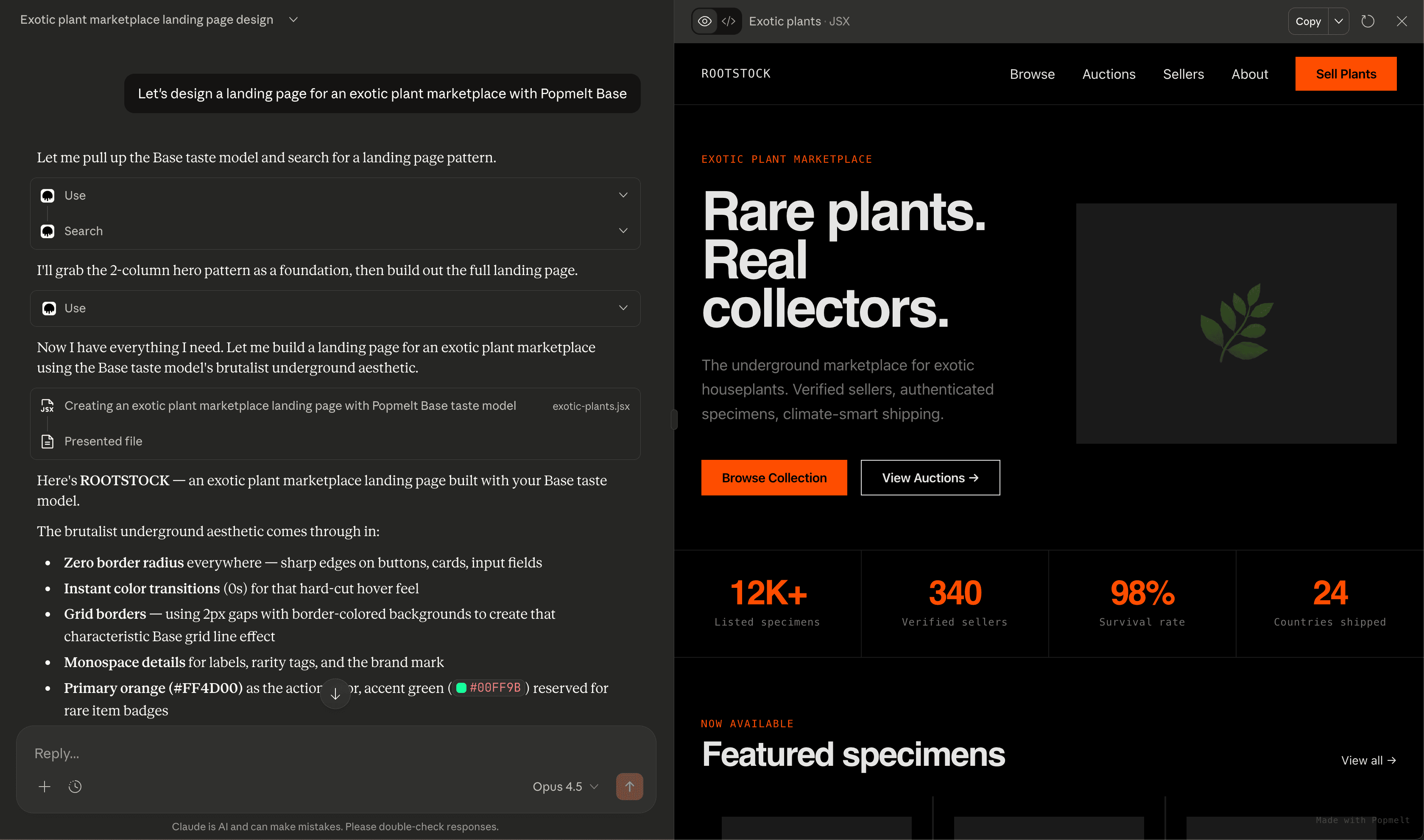
Frontier models like Claude, ChatGPT, or Gemini will have a prototype of your landing page ready in about 60 seconds. We recommend asking Claude or ChatGPT to create a live artifact so you can preview the prototype right there in chat (that's what you're seeing above).
The taste model you choose will be layered into every design decision your AI makes for the rest of the conversation.
Check out the page Claude built above
Not working? Check your connection status and make sure you mention it explicitly ("Use Popmelt to...")
What's next
- Integration Guides - Learn how to connect your tools
- Concepts: Taste Models - Learn more about taste models
- Creating Taste Models - Learn how to create your own models
- MCP Tools - API reference
Better prototypes with less prompting
Start creating